
StudiFoca 1.5.1 is now available on the App Store. It follows 1.5, which brought native iPhone Duo support just ahead of the Duo’s launch.
On iPhone Duo, StudiFoca runs natively on both displays. Folded, its tabs and toolbar buttons sit in the side rail, and form sheets keep Cancel and Save in view while they scroll. Unfolded, the agenda shows more at once.
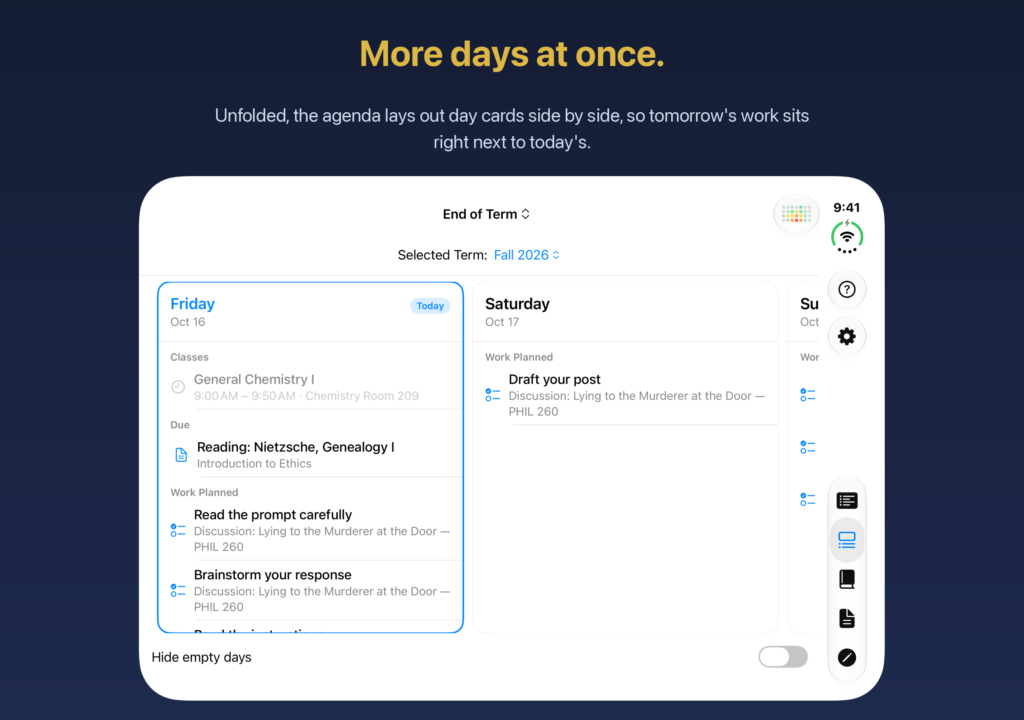
On wider screens (the unfolded Duo and iPad), the agenda now lays out several days side by side instead of one card stretched across the width. It keeps the same day in view when the device rotates, folds, or unfolds.
Also new: term and course details each scroll as one list, so every course, assignment, and assessment stays reachable at any text size. Cards show full titles. The heat map’s Full Term view starts with the term’s first week and ends with the week of its last exam, and a day with more work than time says how much more, such as “36m more than fits.” Full Course Details has a Done button, and a new assessment starts as a quiz at the course’s class time.
New in 1.5.1: the agenda no longer greys out every class as already past (classes dim only once they’ve started), and each day’s classes are listed in time order. On the Duo, Cancel, Save, and Done stay in view on more sheets, and the heat map keeps its days at a readable size on wide screens. Wording and VoiceOver labels are cleaned up throughout. Notifications and synced calendar and reminder titles now separate their parts with a middle dot (·), so items already synced pick up the new titles at the next sync.
Who it’s for: StudiFoca runs on iOS 18.5 or later; the iPhone Duo layout needs a Duo.
StudiFoca on the App Store: https://apps.apple.com/app/id6751607141